
Archify: architecture diagrams your AI agent has to prove
Ask an AI agent to draw your system architecture and you will get a convincing diagram of a system that is almost, but not quite, yours. An extra cache that does not exist. A queue nobody installed. The model has seen ten thousand architectures, and it will happily average them into your repository. I write about that gap between plausible fiction and verified structure elsewhere — Platform Economies is the book — and it shows up in diagramming exactly the way it shows up in market narratives.
Archify is an open-source agent skill (MIT, version 3.0, by tt-a1i) built to close that gap. The agent does not draw directly. It writes a typed JSON description of the system, Archify validates it against a schema and your repository, and only then renders an interactive, self-contained HTML diagram with inline SVG, dark and light themes, and export to PNG, SVG, or WebM. Five diagram types: architecture, workflow, sequence, dataflow, and lifecycle.
I ran it against a real project — a cron-only Cloudflare Worker that monitors S-Bahn departures — and this page is what actually happened, including the four things that broke.
How it works
The pipeline has one idea at its core: separate the claim from the rendering.
- The agent inspects the codebase and authors a
candidate.json— nodes, relationships, boundaries — with source evidence (file and line references) attached to every node it claims exists. finalizeruns the gates: validate (schema check), render, a strict composition check (geometric analysis of the SVG — no browser needed), and an optional real-browser visual QA pass.- The output is one standalone
.htmlfile. No CDN, no fonts fetched, no server. You can mail it to someone.
flowchart LR
    A[Agent inspects repo] --> B[candidate.json + evidence]
    B --> C{validate}
    C --> D[render inline SVG]
    D --> E{strict check}
    E --> F[interactive HTML]
    F -. optional .-> G[browser QA]
That evidence step is the part worth paying attention to. Every node in my diagram carries a small SRC badge linking back to the file it came from. The validator refused to let me pin evidence to a directory that was not the git top level — which is annoying in a monorepo and also exactly the “prove it” behavior you want. Compare that to a Mermaid block you pasted from a chat window: nothing in that pipeline ever checks whether the boxes are real.
Where does that leave PlantUML and Mermaid? Not replaced. PlantUML stays the right tool for versioned, diffable diagrams that live in a repo next to the code — text in, text out, readable in a pull request. Archify is for the audit and the explainer: the diagram you hand to a reviewer, a reader, or your future self, where “the agent invented two of these boxes” is a bug and not a vibe. And if you do enterprise architecture rather than runtime architecture, ArchiMate with jArchi is still its own discipline.
Hands-on: one real diagram, four real failures
The target: my S4 morning monitor — a cron-only Cloudflare Worker that watches westbound S-Bahn München departures, with a geOps WebSocket source, a Bluesky dispatch feed, an MVV EFA fallback, a KV state machine, and Slack plus healthchecks.io as sinks. Small, real, and nobody rehearsed it.
The install is one line:
npx skills add tt-a1i/archify -g --agent '*' -y
Then the agent reads the sources, writes the candidate (mine came out at 4,241 bytes), and runs one command:
node bin/archify.mjs finalize architecture candidate.json s4-monitor.html \
  --repo-root /path/to/repo --quality showcase --json
validate passed 9 of 9 checks on the first draft. The render produced a 761 KB self-contained HTML with the diagram below. Click it — the interactive version has pan, zoom, lens, theme switch, and export, and it works from file://.
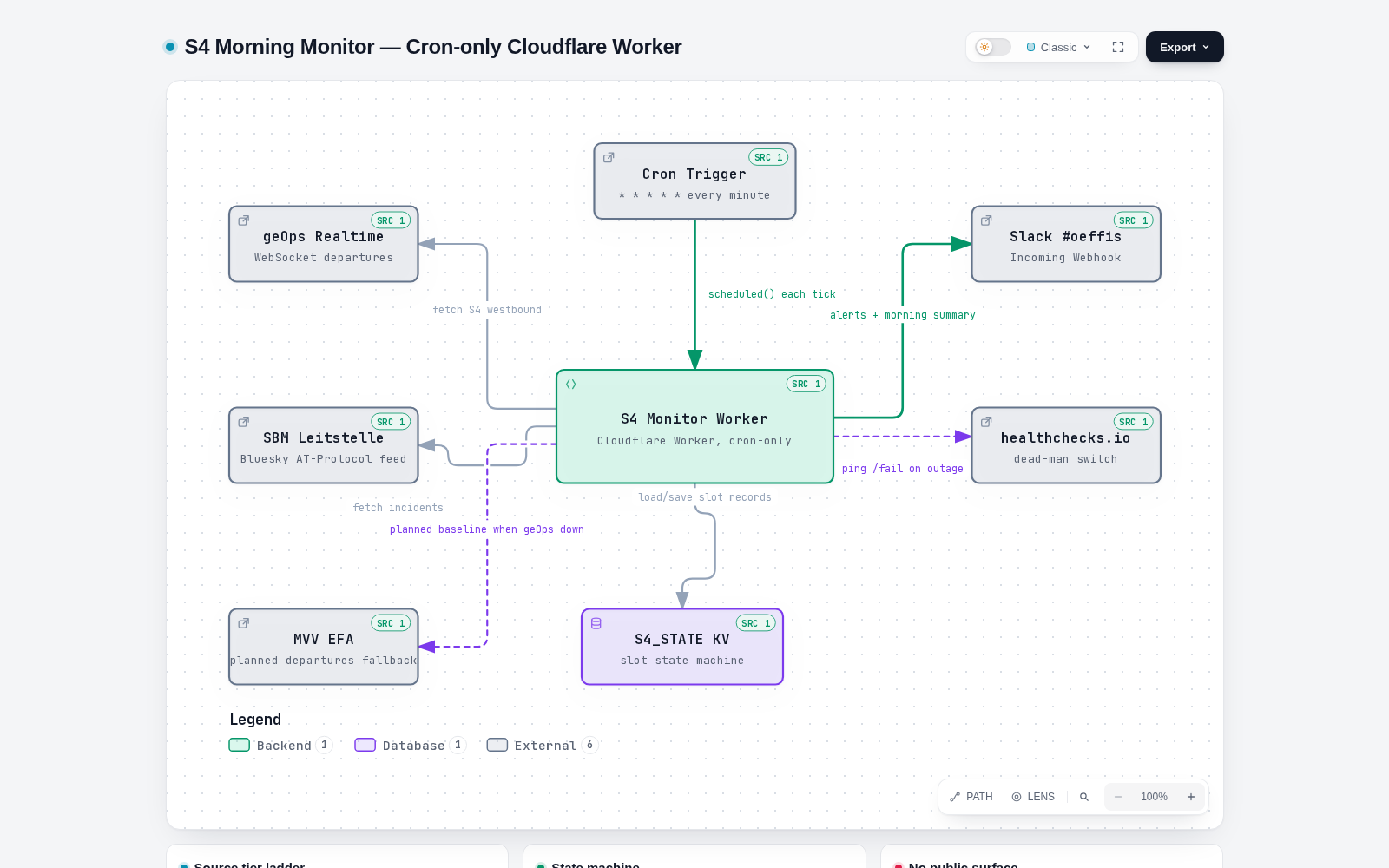
Every box is real: the geOps WebSocket source, the Leitstelle Bluesky feed, the EFA fallback (dashed, because it only exists when the primary is down), the S4_STATE KV, the Slack webhook, the dead-man switch. The badges in the corners are the file references. This diagram was not drawn; it was receipted.
Now the four things that broke, in the order they hit me:
1. The installer wants a TTY. npx skills add opens an interactive picker for target agents; in a headless codespace stdin is not a TTY and the install silently cancels. Fix: --agent '*' -y. If you vendor it into a project instead, note the renderer has zero npm runtime dependencies — plain Node, node:fs and friends.
2. The evidence gate rejects subdirectory roots. Pointing --repo-root at a subfolder of a bigger repo fails with repository-evidence/root-not-top-level. It wants the git top level. I called this a bug for ten minutes before admitting it is the feature: evidence anchored to a subfolder is exactly how “almost true” diagrams happen.
3. No Chrome in a container. The optional browser QA stage died with chrome-unavailable. Codespaces has no Chrome. Archify provides both escape hatches: ARCHIFY_CHROME pointing at any Chromium executable (Playwright’s bundled one works), and ARCHIFY_CHROME_NO_SANDBOX=1 for containers.
4. A genuine race bug. Even with Chromium found, the browser QA pass timed out — every single time, a 15-second Runtime.evaluate timeout. A manual CDP repro showed the cause: Archify evaluates its layout-stability probe the instant Page.loadEventFired fires, and under --headless=new that event can fire while the initial about:blank context is still mid-teardown. The evaluation lands in a destroyed context, Chrome drops the reply, the timer expires. The deterministic composition check — which needs no browser — passes regardless, so delivery was never actually blocked. This one is worth an upstream issue: a readiness poll (or retry on a destroyed context) would fix it.
Total time from npx skills add to the diagram you see above: well under an hour, most of it spent on issue 4 because I refused to believe a tool would ship a race at its final gate. (It did. It happens.)
When to reach for which tool
A concrete decision rule, because “it depends” helps nobody:
- The diagram lives in the repo and gets reviewed in diffs → PlantUML (or Mermaid for quick README embeds). Text wins. My templates, troubleshooting, and C4 pages cover that workflow end to end.
- The diagram is the deliverable — an architecture audit, a handover document, something you send — → Archify. Interactivity, export, and the evidence trail are the point.
- The audience is enterprise architects → ArchiMate, where the semantics of the notation are the message.
One more Archify detail I appreciate: the candidate JSON is small and readable (4 KB for that whole worker), so when the code changes, the agent regenerates the diagram in seconds and you diff the candidate, not a PNG. Diagrams rot because updating them is manual; making the update a one-line command is the actual fix.
💡 A diagram you cannot audit is a story, not a map. That is the standard I hold AI-generated anything to — and it is, in a nutshell, the argument of my book Platform Economies: when platforms compress the distance between a claim and its verification, the people who insist on receipts win. Archify makes your architecture diagrams produce receipts. The book is about why that instinct scales to an economy.
The short version
Archify is the first diagramming tool I have used where “the agent said so” is not the last line of evidence. It gates the drawing, anchors every box to a source file, and ships output you can open offline and hand around. It has rough edges — the TTY installer, the subdirectory evidence gate, the headless-Chrome race — but every rough edge except the last one is the security feature working as designed. Recommended, with receipts.
About the author: Mohammed Brückner writes about platform economics, diagrams that tell the truth, and the tools that keep them honest. He is the author of Platform Economies (2026) and maintains the PlantUML with ArchiMate cluster on this site.